
2. Use-Case A Private-VPC Connectivity to External Networks (Translated)
A VPC Connectivity Profile has exactly one Auto SNAT block, and that block normally satisfies only one External Connection. Part 2 builds the design that lets a Private-VPC tenant reach both its enterprise and the Internet, and shows the two failure states you may pass through on the way.
Intro: Tenant Topology for Cloud Providers running VCF9.1 · 1. Architecture and Foundations · 2. Use-Case A Private-VPC Connectivity to External Networks (Translated) · 3. Use-Case B&C Private-TGW Connectivity to External Networks (Routed or Translated) · 4. Use-Case D One Tenant, Three Exits · 5. Operating the Designs
Part 1 covered the six objects behind a multi-connection Centralized Transit Gateway, where each IP block comes from, and the four rules that decide a packet's source address. It also named the central problem: a VPC Connectivity Profile has exactly one Auto SNAT block. That block satisfies the authorization list of one connection, or of several connections only when they all authorize the same block, as in Part 4. Authorizing the Internet-facing range on the WAN connection to an enterprise is not the common case, so in practice one block serves one exit.
This part builds the first steady-state design that solves it. The tenant is Cairo: workloads on a Private-VPC subnet, an enterprise that accepts traffic only from a provider-assigned range. The technique is Provider Outbound SNAT on the enterprise connection. We build it in dependency order, trace both packet paths hop by hop, and verify the result.
The Requirement
Cairo runs its workloads on Private-VPC subnets. They need two exits: the Internet, and Cairo Enterprise's network (10.111.1.0/24) over the tenant's private VRF Cairo-wan-vrf. Cairo Enterprise accepts traffic only from the provider-assigned range 10.100.10.0/24 and must never see the tenant's private addressing. The tenant must not have to write NAT rules per workload, and the Internet exit must keep using the Internet-facing block.
In terms of the Part 1 rules: the profile's single Auto SNAT block is tuned for the Internet exit, and the enterprise connection has to correct the source on its own, because it does not authorize that block. Internet-facing addresses are not normally authorized over a WAN link.
Topology
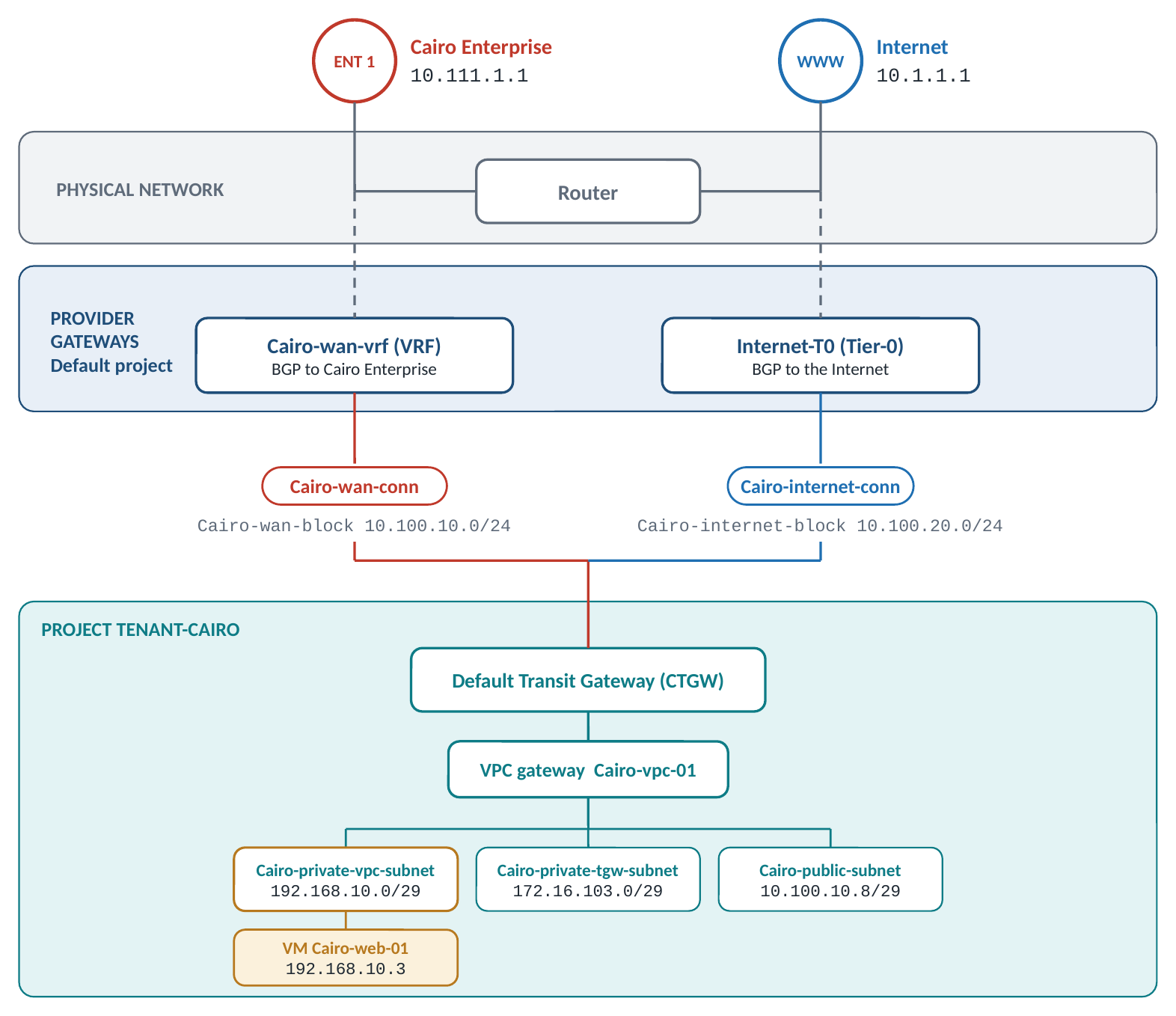
Cairo-wan-conn on VRF Cairo-wan-vrf, Cairo-internet-conn on Internet-T0), one Centralized Transit Gateway, and the test workload Cairo-web-01 on the Private-VPC subnet.Design at a glance. The address plan is the reference plan from Part 1.
| Value | |
|---|---|
| Project | Tenant-Cairo, one Default Transit Gateway (CTGW) with two attachments |
| Enterprise connection | Cairo-wan-conn, centralized, on VRF Cairo-wan-vrf; remote network 10.111.1.0/24 |
| Internet connection | Cairo-internet-conn, centralized, on Tier-0 Internet-T0; default route |
| Enterprise-facing block | Cairo-wan-block_10.100.10.0/24, authorized on Cairo-wan-conn; the Provider SNAT pool of that connection |
| Internet-facing block | Cairo-internet-block_10.100.20.0/24, authorized on Cairo-internet-conn; the Auto SNAT block of the profile |
| Workload | Cairo-web-01 192.168.10.3 on Cairo-private-vpc-subnet 192.168.10.0/29 (Private-VPC) in VPC Cairo-vpc-01 |
| Test destinations | 10.111.1.1 in Cairo Enterprise, 10.1.1.1 on the Internet |
Steady-State Design
| Object (Step) | Setting | Value | Purpose |
|---|---|---|---|
| External IP Blocks (1) | Blocks | Cairo-wan-block_10.100.10.0/24, Cairo-internet-block_10.100.20.0/24 |
One block per exit: the enterprise-facing range and the Internet-facing range |
Cairo-wan-conn (2) |
Type / gateway | Centralized, VRF Cairo-wan-vrf |
Private link to Cairo Enterprise |
| Remote Networks | Cairo Enterprise prefixes | Steers only enterprise traffic here | |
| External IP Blocks | Cairo-wan-block |
Only this range is advertised to the VRF | |
| Provider Outbound SNAT / SNAT IP Blocks | On / Cairo-wan-block |
Corrects the source of every packet leaving here | |
Cairo-internet-conn (2) |
Type / gateway | Centralized, Tier-0 Internet-T0 |
Shared Internet exit |
| Remote Networks | Default route (0.0.0.0/0) |
Everything not matched elsewhere | |
| External IP Blocks / Provider SNAT | Cairo-internet-block / Off |
Accepts the Auto SNAT address as it is | |
Project Tenant-Cairo (3) |
Connections / blocks | Both connections / both blocks | Makes them selectable inside the project |
| Default Transit Gateway (4) | Connections | Cairo-wan-conn and Cairo-internet-conn |
Two attachments, one default route |
| VPC Connectivity Profile (5) | External IP Blocks | Cairo-wan-block, Cairo-internet-block |
Both ranges usable by VPCs |
| Default Outbound NAT / Auto SNAT block | On / Cairo-internet-block |
The single tenant-side translation, tuned for the Internet exit | |
VPC Cairo-vpc-01 |
Subnets | Cairo-private-vpc-subnet 192.168.10.0/29 (workloads), Cairo-public-subnet 10.100.10.8/29 |
Private workloads plus a public subnet from the enterprise-facing block |
The End-to-End Workflow
Provider objects first, then the tenant's edits to the objects the project created. Provider SNAT on Cairo-wan-conn can be enabled at creation or later.
Provider space
1. Create the two External IP Blocks. In the Default project, under Networking > IP Address Pools > IP Address Blocks, create Cairo-wan-block_10.100.10.0/24 and Cairo-internet-block_10.100.20.0/24. The CIDR is in the name because every later dropdown shows the name only.
2. Create the two External Connections. Under Networking > VPC Connectivity > External Connections > Add External Connection:
Cairo-wan-conn
  Type ................... Centralized
  Tier-0 Gateway ......... Cairo-wan-vrf (VRF)
  Remote Networks ........ Cairo Enterprise prefixes (10.111.1.0/24)
  External IP Blocks ..... Cairo-wan-block_10.100.10.0/24
  Provider Outbound SNAT . On
  SNAT IP Blocks ......... Cairo-wan-block_10.100.10.0/24

Cairo-internet-conn
  Type ................... Centralized
  Tier-0 Gateway ......... Internet-T0 (Tier-0)
  Remote Networks ........ 0.0.0.0/0 (default route)
  External IP Blocks ..... Cairo-internet-block_10.100.20.0/24
  Provider Outbound SNAT . Off
The SNAT IP Blocks dropdown offers only the blocks this connection authorizes, so Cairo-wan-block is the only candidate on Cairo-wan-conn.
3. Create the project. From the project drop-down, Manage > Add Project. In Set External Connections, assign both connections and choose one as the External Connection for the Default Transit Gateway. In the reference environment the project starts with one External Connection, Cairo-wan-conn, on the Transit Gateway; Cairo-internet-conn is attached in the next step. In Set External IP Blocks, assign both blocks and pre-load them into the Default VPC Connectivity Profile.
Tenant (project) space
4. Attach the second connection. Inside Tenant-Cairo, Networking > Transit Gateways > ⋮ > Edit, pick Cairo-internet-conn under External Connection (it must be one of the connections assigned to the project in step 3), save, and wait for the status to change from In Progress to Success. The gateway now has two attachments and one default route (on Cairo-internet-conn).
5. Set the profile. Under VPC > Profiles > VPC Connectivity Profile > ⋮ > Edit, confirm both blocks are listed under External IP Blocks, switch Default Outbound NAT on, and set the External IP Block for Default Outbound NAT to Cairo-internet-block.
6. Create the VPC and subnets. Cairo-vpc-01 with the Private-VPC subnet Cairo-private-vpc-subnet 192.168.10.0/29 for the workloads and the public subnet Cairo-public-subnet 10.100.10.8/29 from the enterprise-facing block. The test workload Cairo-web-01 is on the private subnet at 192.168.10.3.
What NSX Programs Automatically
No hand-written NAT rule is needed. Three things are created for you:
- On the VPC gateway: one Default Outbound NAT rule for the VPC, translating private sources to an address from
Cairo-internet-block. It exists because the profile toggle is on. - On the CTGW, scoped to
Cairo-wan-connonly: a Provider SNAT rule that translates any source outside the connection's authorized blocks to an address from the SNAT IP BlockCairo-wan-block, and a No-SNAT rule for sources already inside the authorized blocks, so they are not translated twice. The No-SNAT rule ranks below any user-defined TGW SNAT rule. Both rules are created and removed with the Provider Outbound SNAT toggle. Nothing is created forCairo-internet-conn. - Route advertisement: the CTGW advertises prefixes from
Cairo-wan-blocktowardCairo-wan-vrfand prefixes fromCairo-internet-blocktowardInternet-T0, because each connection's External IP Blocks limit what the CTGW advertises to that gateway.
Packet Walks
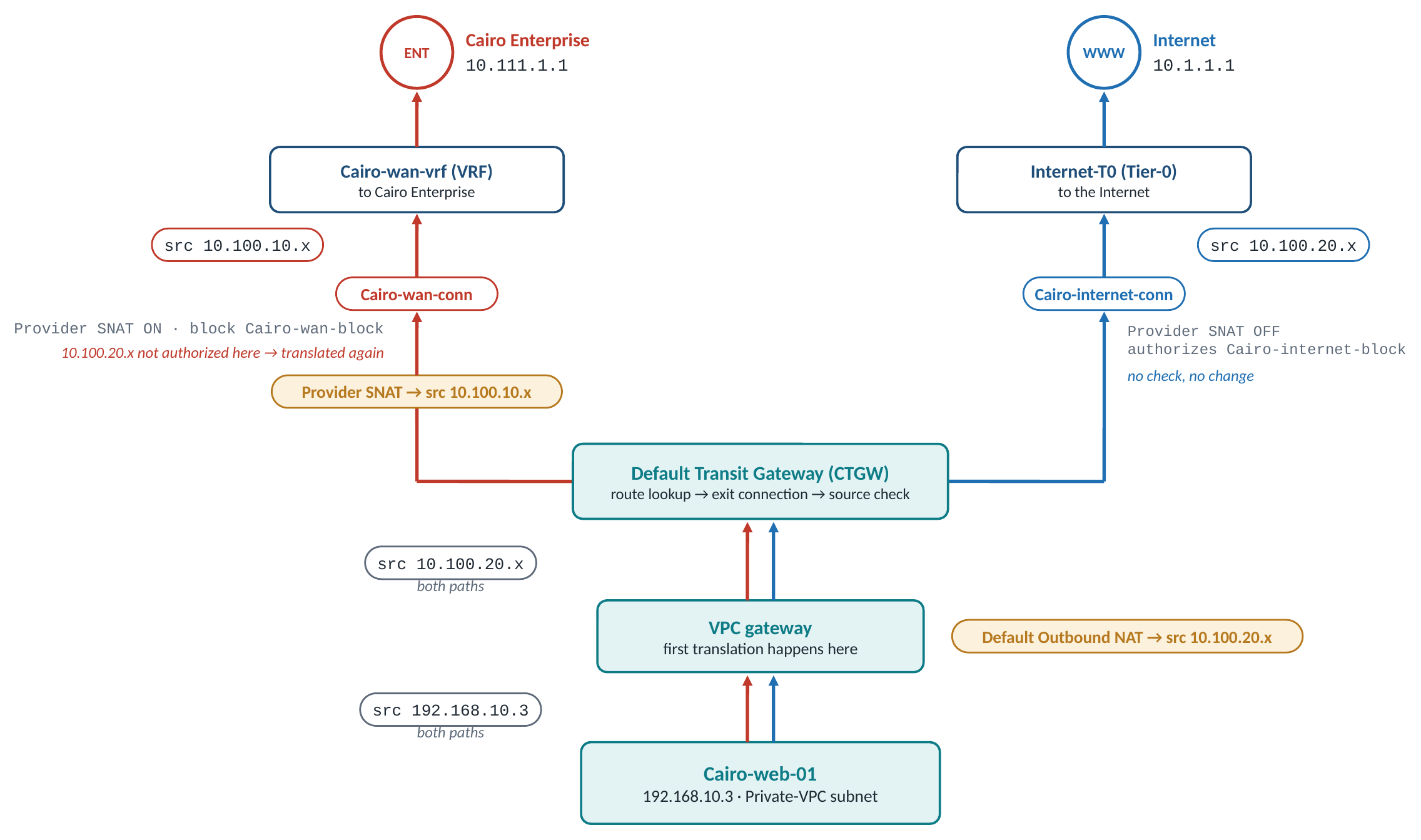
Path A — to the enterprise (10.111.1.1)
| Hop | Source → Destination | What happens |
|---|---|---|
| 1. VM sends | 192.168.10.3 → 10.111.1.1 |
Leaves the Private-VPC subnet |
| 2. VPC gateway | 10.100.20.x → 10.111.1.1 |
Rule 1: Default Outbound NAT translates the source to the Auto SNAT block Cairo-internet-block. The packet now looks like Internet traffic |
| 3. CTGW route lookup | – | Rule 2: 10.111.1.1 is reachable through Cairo-wan-conn |
| 4. CTGW source check | – | Rule 3: Provider SNAT is on here, so 10.100.20.x is compared with the authorized block 10.100.10.0/24: no match |
| 5. CTGW Provider SNAT | 10.100.10.x → 10.111.1.1 |
Second translation, to the SNAT IP Block Cairo-wan-block |
6. Exit to Cairo-wan-vrf |
10.100.10.x → 10.111.1.1 |
The source is inside the block advertised to the VRF; the enterprise sees only the authorized 10.100.10.0/24 range and can route the reply |
| 7. Reply | 10.111.1.1 → 10.100.10.x |
Returns through Cairo-wan-vrf; the CTGW reverses its translation, the VPC gateway reverses its own, and the VM receives 10.111.1.1 → 192.168.10.3 |
Path B — to the Internet (10.1.1.1)
| Hop | Source → Destination | What happens |
|---|---|---|
| 1. VM sends | 192.168.10.3 → 10.1.1.1 |
Leaves the same subnet |
| 2. VPC gateway | 10.100.20.x → 10.1.1.1 |
Same first translation as in Path A |
| 3. CTGW route lookup | – | Default route through Cairo-internet-conn |
| 4. CTGW | – | Provider SNAT is off on Cairo-internet-conn: no check, no second translation |
5. Exit to Internet-T0 |
10.100.20.x → 10.1.1.1 |
The packet keeps the address set at the VPC boundary, which Cairo-internet-conn authorizes |
Verification
From the test workload, both destinations must answer:
# From Cairo-web-01 (192.168.10.3, Private-VPC subnet)
ping 10.111.1.1   # Cairo Enterprise, via Cairo-wan-conn  — expected: success
ping 10.1.1.1     # Internet, via Cairo-internet-conn     — expected: success
Check the translation count on each path, not just reachability: traffic to 10.1.1.1 is translated once, at the VPC gateway; traffic to 10.111.1.1 is translated at the VPC gateway and again at the CTGW by Provider SNAT. The enterprise sees 10.100.10.x, the Internet sees 10.100.20.x, and neither ever sees 192.168.10.3.
The two common failure states you may pass through
Two intermediate states are worth knowing. They are what a half-finished configuration looks like in production.
State 1 — only the enterprise connection is attached. With Cairo-wan-conn as the Transit Gateway's only connection there is no default route: 10.1.1.1 is unreachable. Attaching Cairo-internet-conn fixes it.
State 2 — both connections attached, Auto SNAT block set to Cairo-internet-block, Provider SNAT still off on Cairo-wan-conn. The Internet works and the enterprise breaks. Enterprise-bound packets reach the CTGW carrying 10.100.20.x, a source that Cairo-wan-conn does not authorize and never advertised to Cairo-wan-vrf. Rule 4 applies: the source is not routable through Cairo-wan-conn, and 10.111.1.1 is unreachable.
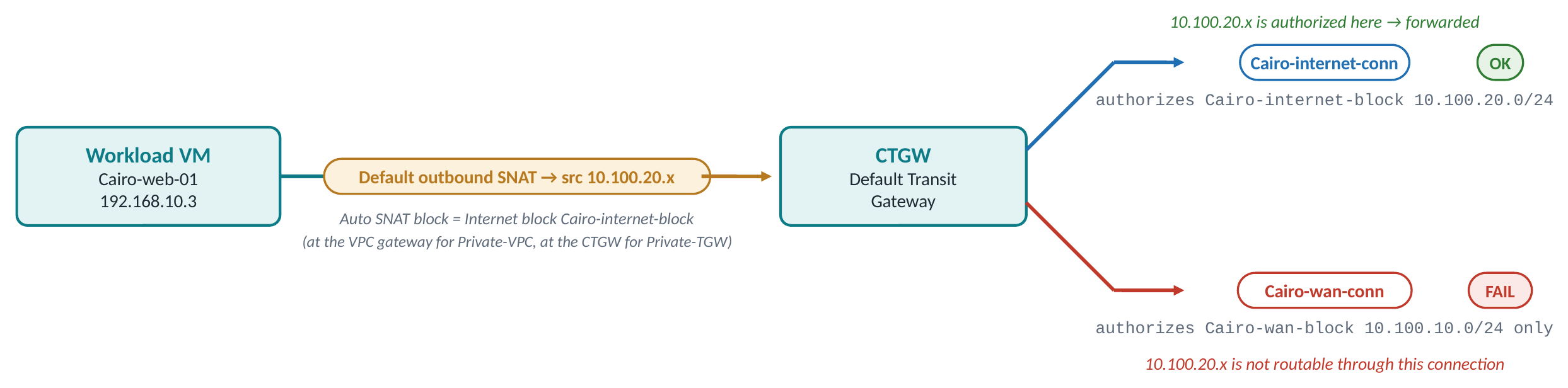
Enabling Provider Outbound SNAT with Cairo-wan-block on Cairo-wan-conn resolves State 2 and produces the steady state above.
Note: The mirror image fails too. With the Auto SNAT block set toCairo-wan-blockinstead, the enterprise path would work and Internet-bound packets would leave with10.100.10.x, whichCairo-internet-conndoes not authorize. Whichever block the profile uses, the other connection needs its own correction.
The key contrast: the Auto SNAT block belongs to the profile and applies to every destination; the SNAT IP Block belongs to one connection and applies only to traffic leaving through it. A profile has exactly one Auto SNAT block, so in most cases it can be tuned for one exit only; Provider SNAT lets the other exit correct the source on its own.
Design Notes
- Traffic from the public subnet
Cairo-public-subnet10.100.10.8/29already carries an authorized address, so onCairo-wan-connit matches the No-SNAT rule and passes untranslated. - The enterprise never learns the tenant's private addressing. It sees a provider-owned range, which is often exactly what an enterprise firewall policy requires.
- The cost is the double translation on the enterprise path: per-source logging on the enterprise side maps back to a workload only through the CTGW's NAT state.
- Provider SNAT is per connection, so attaching a third connection later does not change the behaviour of the first two.
What Comes Next
Use case A hides the tenant completely behind provider-owned addresses. The price is two translations and NAT state at two points on the enterprise path. Some enterprises want the opposite: to see the real workload addresses so their firewall rules, logs and monitoring identify workloads directly. That needs the CTGW to still hold the original private address when it decides, which a Private-VPC subnet can never offer.
Part 3 moves to Alex, whose workloads sit on a Private-TGW subnet, and builds the advertisement design: the provider grants permission on the connection, the tenant adds an advertise rule, and the enterprise learns the tenant's private block as a tgws route with no NAT on the path. It then shows the alternative for the same tenant when the enterprise insists on provider-owned addresses.
Intro: Tenant Topology for Cloud Providers running VCF9.1 · 1. Architecture and Foundations · 2. Use-Case A Private-VPC Connectivity to External Networks (Translated) · 3. Use-Case B&C Private-TGW Connectivity to External Networks (Routed or Translated) · 4. Use-Case D One Tenant, Three Exits · 5. Operating the Designs